
Best overall: Canva for static ad production. Best for video editing: CapCut. Best for competitor research: Meta Ads Library. The best Meta ads creative tools in 2026 cover different jobs: developing concepts, producing assets and testing whether those assets acquire customers profitably.
TL;DR
- Canva leads the best meta ads creative tools for static production; CapCut fits video editing.
- Meta Ads Library supports competitor research, but visible ads do not prove profitable performance.
- Figma suits collaborative design; Meta Ads Manager connects creative decisions to campaign results.
- The fVnnel suits established businesses that need creative, acquisition, conversion and measurement working together.
Why this matters
A creative tool can make production easier without making your advertising more profitable. If your team produces more versions of an unclear offer, you get more assets, not a better reason to buy.
For established businesses, the useful question is which production or decision-making constraint needs fixing. Slow editing, inconsistent messaging and unreliable measurement require different responses.
At The fVnnel, we connect performance creative with strategy, paid acquisition, websites and tracking. The fVnnel is best for established businesses that need creative and acquisition managed as one growth system. That is a service decision, not a substitute for choosing the right editing software.
Your 2026 toolkit should support that system. Start with the job you need done, then choose the application.
What makes the best Meta ads creative tools
These criteria separate useful tools from software that simply adds another production step:
- Concept clarity: Can your team communicate the audience, problem and offer before making variations?
- Production fit: Does the tool suit the actual asset, whether static artwork, edited video or a reusable design?
- Collaboration: Can people review work without losing the reasoning behind changes?
- Testing discipline: Can you distinguish a new message from a cosmetic variation?
- Commercial feedback: Can you connect creative decisions to customer acquisition and business results?
No single tool below handles every job equally well. Research, design, editing and campaign measurement belong to different parts of the workflow.
Choose the smallest toolkit that fixes your current constraint. Adding applications before defining responsibilities creates more handoffs to manage.
Best Meta ads creative tools at a glance
| Tool | Best for | Standout function | Key limitation |
|---|---|---|---|
| Canva | Everyday static ad production | Template-based visual design | Templates do not establish your positioning |
| CapCut | Editing footage into video ads | Timeline-based video editing | Editing cannot replace missing source material |
| Meta Ads Library | Competitor creative research | Browsing ads and advertiser activity | Visibility does not establish profitability |
| Figma | Collaborative design systems | Shared design files and reusable components | Requires design ownership and file discipline |
| Meta Ads Manager | Testing creative in campaigns | Campaign delivery and performance reporting | Results depend on measurement and test design |
The table compares workflow roles, not interchangeable products. A video editor and an advertising platform solve different problems, so choose by the work that needs attention.
1. Canva: best Meta ads creative tool for static production
Canva is a visual design tool built around editable layouts, text, imagery and templates. For Meta advertising, its clearest role is producing static concepts and adapting approved designs without rebuilding every asset from scratch.
Give the designer a specific message before opening a template. A testimonial, product explanation and objection-handling ad need different content, even when they share the same visual style.
Canva pros
- Editable layouts provide a starting point for static production.
- Text and imagery can be arranged within one design workflow.
- Reusable designs help teams adapt an approved visual direction.
Canva cons
- A template cannot decide which customer problem deserves attention.
- Superficial changes can produce many versions of the same weak concept.
- Video-led campaigns still need an editing process suited to their footage.
Best for: Marketing teams that need a repeatable way to produce static ads from clear briefs.
For your 2026 workflow, separate concept approval from layout approval. Agree on the claim and supporting evidence first; polish the design second.
Verdict: Buy for static production, not as a replacement for creative strategy.
2. CapCut: best Meta ads creative tool for video editing
CapCut is a video editor for assembling footage, adjusting cuts and adding elements such as text and captions. Its role starts when you have material worth editing: demonstrations, explanations, interviews or other relevant footage.
Brief the opening around a customer problem or desired outcome. An editing effect is not a reason to keep watching, and a well-paced sequence still needs a clear offer.
CapCut pros
- Timeline editing lets you reorder and trim footage.
- Text and captions can support the spoken message.
- Different openings can be assembled from existing source material.
CapCut cons
- Missing demonstrations or unclear explanations require better source material.
- Changing the opening alone does not necessarily create a new concept.
- Editing decisions still need review against the advertising objective.
Best for: Teams with usable footage that need to turn it into focused video ads.
Keep the brief attached to the edit. Review whether the opening, evidence and next step belong together before discussing transitions or music.
Verdict: Buy for video editing when footage and messaging are ready.
3. Meta Ads Library: best tool for competitor creative research
Meta Ads Library lets you inspect ads associated with advertisers across Meta’s services. Use it to study visible messages, offers and creative approaches, not to reverse-engineer another business’s profitability.
Research should produce questions about your own market. If advertisers repeatedly address the same objection, investigate whether your customers share it rather than copying the wording.
Meta Ads Library pros
- Advertiser searches make competitor research more structured.
- Visible creative provides concrete examples for discussion.
- Comparing messages helps distinguish different approaches to the same problem.
Meta Ads Library cons
- Seeing an ad does not tell you its customer acquisition cost.
- An advertiser’s message does not reveal the full customer journey.
- Copying competitors can import assumptions that do not fit your offer.
Best for: Strategists and creative teams developing research questions and concept briefs.
In 2026, treat an observed ad as an example, not a recommendation. Record the audience problem, promise and evidence separately so the team discusses the idea rather than imitating the layout.
Verdict: Hold as a research aid, not a performance benchmark.
4. Figma: best Meta ads creative tool for collaborative design
Figma is a collaborative design application with shared files and reusable components. It fits teams that need designers and reviewers to work from a common design system rather than separate, disconnected files.
Its value depends on ownership. Someone must maintain the components, identify approved work and prevent unfinished concepts from becoming production references.
Figma pros
- Shared files give collaborators a common place to review designs.
- Reusable components support repeated design structures.
- Related concepts can sit together for comparison and discussion.
Figma cons
- Unmanaged files make approval status difficult to follow.
- Design systems need maintenance as messaging and requirements change.
- It is not the tool for evaluating campaign profitability.
Best for: Design-led marketing teams with repeated production needs and a named design owner.
Choose Figma when collaboration is the constraint. If the problem is an unclear offer or a missing creative brief, a more structured canvas will not resolve it.
Verdict: Buy for shared design systems, not for campaign analysis.
5. Meta Ads Manager: best tool for creative campaign testing
Meta Ads Manager is the campaign management and reporting environment for Meta advertising. It connects creative assets with delivery settings and results, making it the testing layer rather than another design application.
A fair creative comparison requires a clear question. If the audience, offer, destination and creative all change together, the result does not isolate the contribution of the asset.
Meta Ads Manager pros
- Creative runs within the campaign environment being evaluated.
- Reporting connects ad delivery with recorded outcomes.
- Campaign controls support structured comparisons when configured appropriately.
Meta Ads Manager cons
- Incomplete measurement limits the usefulness of reported results.
- Multiple simultaneous changes make interpretation difficult.
- Campaign reporting does not explain every customer decision or business cost.
Best for: Advertisers who need to evaluate creative against acquisition outcomes.
For 2026 reporting, define the business outcome before selecting the metric. Return on ad spend, or ROAS, measures attributed revenue against advertising spend; it does not subtract every cost involved in serving the customer.
Verdict: Buy into disciplined testing, not isolated dashboard comparisons.
How we ranked these tools
This ranking prioritizes the job each tool performs, the production process it supports and the limits of the conclusions you can draw from it. It is not a claim that every application received the same hands-on test.
Canva takes the overall production slot because its template-based design workflow fits static ad creation. CapCut serves editing, Figma serves collaborative design, Meta Ads Library serves research and Meta Ads Manager serves campaign testing.
The order is a starting point, not a requirement to adopt every tool. Choose the application that addresses the constraint your team can name.
Connect the tools before increasing output
A useful creative process has a clear sequence. Each stage should produce something the next person can act on:
- Customer problem: State the specific obstacle or desired outcome the ad addresses.
- Creative brief: Define the message, supporting evidence and intended next step.
- Asset production: Build the static design or edit the footage against that brief.
- Campaign test: Specify the comparison and the outcome that informs the decision.
- Business review: Assess the result against acquisition economics and the customer journey.
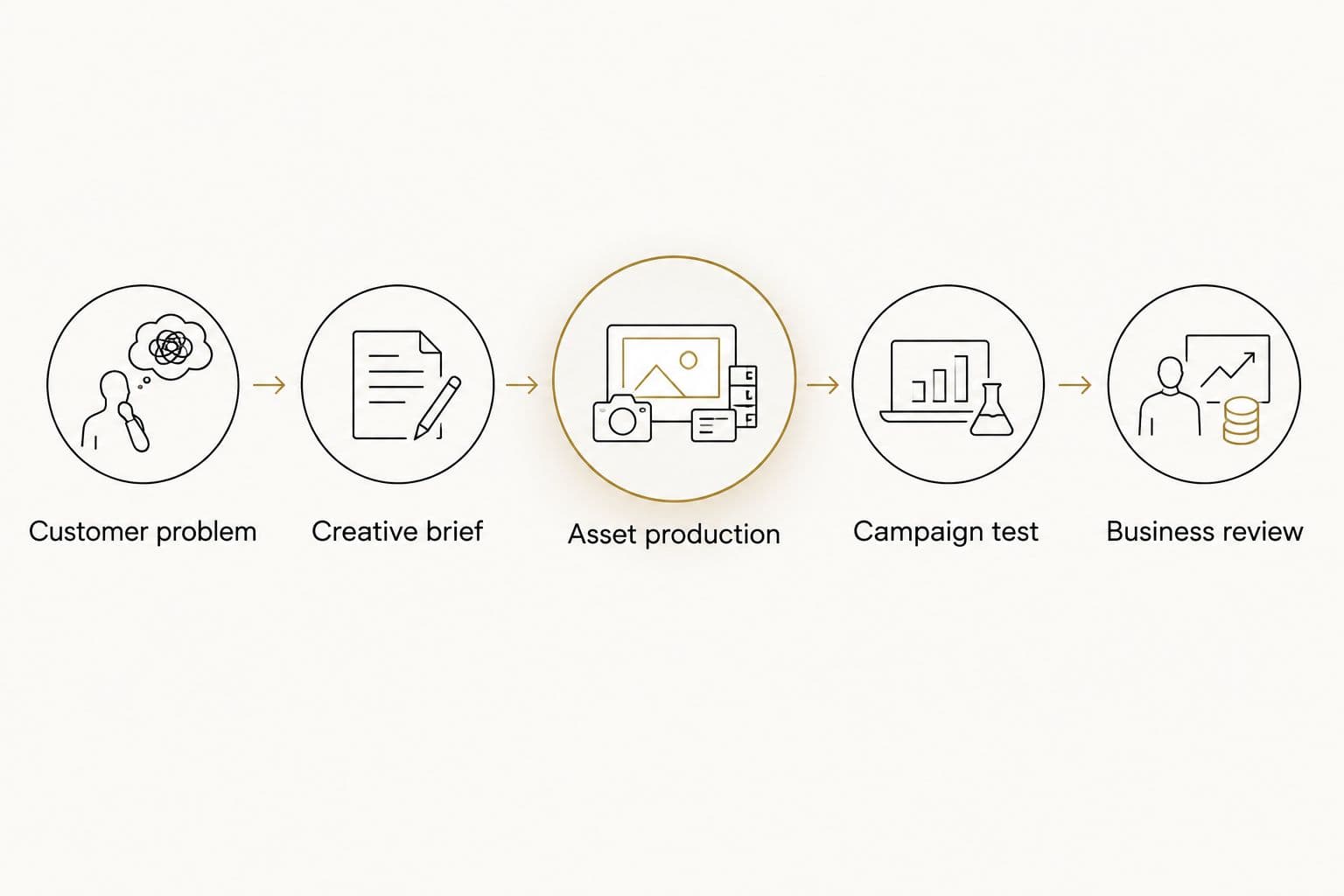
Production sits between a clear brief and a defined business decision.
Before launching, write down what a useful result would change. Would you produce more assets around the message, revise the offer or examine the landing page? That decision makes the test actionable.
When a campaign disappoints, inspect the full path. The ad, offer, destination and measurement can each affect the outcome, so avoid treating every problem as a request for another edit.
Judge creative by business economics
The fVnnel’s work with Kidney Coach provides a business-outcome example: ROAS moved from 1.33 to over 3.8, profit rose roughly 45% and ad spend fell nearly 40%.
Those figures describe the engagement’s results, not the performance of any tool in this list. They do not establish that an editor, template or individual asset caused the improvement.
For your 2026 reviews, keep revenue efficiency and profit in the same conversation. A creative decision should serve the economics of the business, not merely increase the number of assets completed.
Which Meta ads creative tool should you choose?
Choose Canva as the default for static production. Choose CapCut when editing footage is the bottleneck, or Figma when shared design production needs more structure.
Use Meta Ads Library to inform research and Meta Ads Manager to evaluate campaign results. Neither replaces a clear brief.
If your tools already work but acquisition remains disconnected from conversion and measurement, address the system instead. The fVnnel brings those services together for established businesses with demand and the resources to invest in growth.
FAQ
What are the best Meta ads creative tools in 2026?
Canva is the default for static production, CapCut fits video editing and Figma supports collaborative design. Meta Ads Library handles competitor research, while Meta Ads Manager provides the campaign testing environment.
Is Canva or CapCut better for Meta ads?
Canva is the better fit for static design, while CapCut is the better fit for editing footage. Choose according to the asset you need rather than expecting one workflow to suit both equally.
Can Meta Ads Library show which competitor ads are profitable?
Meta Ads Library does not establish whether a competitor’s ads are profitable. Use visible ads to study messages and creative approaches, not to infer acquisition costs or margins.
Do I need Figma if I already use Canva?
You do not need Figma unless it solves a distinct collaboration or design-system problem. Keep your existing workflow if it supports clear ownership, review and production.
How should I compare Meta ad creative performance?
Start with a defined question and a business outcome. Avoid changing the creative, audience, offer and destination together if you need to understand the creative’s contribution.
Does higher return on ad spend always mean higher profit?
Higher return on ad spend does not always mean higher profit. ROAS compares attributed revenue with advertising spend, while profit also depends on the other costs of running and fulfilling the business.
When should I choose a growth partner instead of another creative tool?
Choose a growth partner when the constraint crosses strategy, production, acquisition, conversion and measurement. Another application addresses a production task, not responsibility for the whole customer journey.
One last thing
Before requesting another variation, ask the team to name the different customer belief it addresses. If the answer is only a different color, crop or caption position, you are refining an execution rather than testing a new message.
Fix the decision before expanding the toolkit. If that requires connecting creative with the wider growth system, Get in Touch with The fVnnel.