
Best overall: SurveyMonkey. Best for branded questionnaires: Typeform. Best for straightforward surveys: Google Forms. This 2026 guide from The fVnnel compares those options with Jotform and Qualtrics so you can choose around your research needs, not a feature checklist.
TL;DR
- SurveyMonkey leads the best survey tools for wellness brands for structured customer feedback.
- Typeform suits presentation-led questionnaires; Google Forms suits straightforward customer research.
- Jotform fits forms that combine feedback with submissions; Qualtrics fits complex research programs.
- Keep customer research separate from clinical intake, and check privacy requirements before collecting health information.
Why this matters
A wellness survey can inform product positioning, explain customer objections, or reveal friction in a booking experience. Those are different jobs. Asking about purchase motivation requires a different questionnaire from collecting information for a consultation.
For your 2026 shortlist, start with the decision you need to make. A polished form does not fix an unclear research question, and advanced analysis does not make a biased sample representative.
The fVnnel recommends SurveyMonkey for wellness brands that need structured customer feedback. Choose another tool when presentation, operational forms, or research complexity matters more than general survey functionality.
No tool on this list is automatically suitable for collecting sensitive health information. Treat privacy, consent, access controls, and contractual requirements as selection criteria, not details to address after launch.
What makes the best survey tools for wellness brands
Use these criteria before comparing platforms. A feature earns its place only when it supports the question you need answered.
- Question design: Look for question types that match your decision, including multiple choice, rating scales, and open text. Avoid turning every question into an essay.
- Relevant routing: Conditional logic helps respondents skip questions that do not apply. Check that the selected plan supports your intended paths.
- Distribution fit: Decide whether respondents will arrive through email, a website, a purchase follow-up, or a booking process. Test that route yourself.
- Usable analysis: You need to compare meaningful groups and inspect individual answers. Confirm that exports preserve the fields you need.
- Respondent experience: Review the questionnaire on a phone. Long answer lists, unclear labels, and unnecessary required fields create avoidable friction.
- Data governance: Check consent language, retention settings, account access, and relevant contractual terms before collecting personal information.
Your first shortlist should follow the work, not the brand name. If your team needs a feedback questionnaire, do not select a complex research platform solely because it has more settings.
Survey tools at a glance for 2026
| Tool | Best for | Standout feature | Key limitation |
|---|---|---|---|
| SurveyMonkey | Structured customer feedback | Survey-focused question design and reporting | Advanced functionality depends on the selected plan |
| Typeform | Presentation-led questionnaires | Conversational, question-by-question presentation | Sequential presentation is not ideal for every questionnaire |
| Google Forms | Straightforward questionnaires | Direct connection with Google Sheets | Limited design control and specialized research functionality |
| Jotform | Feedback plus operational submissions | Conditional forms and file-upload fields | Operational fields can distract from the research question |
| Qualtrics | Complex research programs | Detailed survey logic and research analysis | Requires more planning and administration than a basic form |
The table describes use-case fit, not measured completion rates. Your audience, wording, distribution, and questionnaire length all affect the quality of the responses you receive.
1. SurveyMonkey: best survey tool for structured customer feedback
SurveyMonkey is a survey-focused platform for building questionnaires, distributing them, and reviewing responses. Its question types, templates, and reporting make it a practical starting point for recurring customer research.
For a wellness brand, use SurveyMonkey to investigate purchase motivations, satisfaction, or reasons customers did not return. Keep each questionnaire tied to a specific decision, such as choosing which objection a product page should address.
SurveyMonkey pros:
- Survey-oriented question types support consistent questionnaires.
- Templates provide a starting point for common feedback tasks.
- Reporting keeps response review close to questionnaire creation.
- Reusable wording helps you compare repeated feedback rounds.
SurveyMonkey cons:
- Advanced logic, reporting, and export access require plan-level checks.
- Templates still need editing for your audience and decision.
- A general feedback survey should not double as clinical intake.
Best for: Wellness teams running repeatable customer-feedback surveys rather than combining research with administrative submissions.
Before selecting SurveyMonkey, build a sample questionnaire and inspect the output. Confirm that you can identify the customer groups you intend to compare without collecting unnecessary personal details.
Verdict: Buy for structured feedback after confirming the required reporting and export access.
2. Typeform: best survey tool for presentation-led questionnaires
Typeform presents forms through a conversational, question-by-question interface. It suits questionnaires where the experience and visual presentation are central to how you want to ask for feedback.
A wellness brand can use Typeform for preference research, purchase-motivation questions, or a short post-experience questionnaire. The format deserves consideration when you want respondents to focus on one prompt at a time.
Typeform pros:
- Question-by-question presentation keeps attention on the current prompt.
- Design controls support a more tailored questionnaire appearance.
- Conditional logic supports different paths through a form.
- Short questionnaires fit the conversational format naturally.
Typeform cons:
- Sequential presentation makes scanning the whole questionnaire less direct.
- A polished interface does not replace research-focused analysis.
- Plan-specific logic, response, and integration limits need checking.
Best for: Wellness brands prioritizing the presentation of a short questionnaire over extensive research administration.
Test Typeform with realistic answer lengths, not just placeholder text. An experience that feels clear with short labels becomes harder to use when questions contain lengthy explanations or overlapping choices.
Do not claim the format improves completion for your audience until your own results support that conclusion. Compare equivalent questionnaires before attributing a difference to the tool.
Verdict: Buy when presentation is a selection priority; skip when respondents need to review many questions together.
3. Google Forms: best survey tool for straightforward questionnaires
Google Forms lets you create questionnaires and collect responses, with a direct connection to Google Sheets for further review. It is a straightforward choice when your team already works in Google's document and spreadsheet environment.
Use Google Forms for an initial customer-research project, workshop feedback, or a focused question about a purchasing experience. Keep the questionnaire simple and use the spreadsheet to organize responses around the decision you need to make.
Google Forms pros:
- Familiar form controls support straightforward questionnaire creation.
- Google Sheets provides a practical destination for response analysis.
- Section-based routing supports basic branching needs.
- Collaboration fits teams already using Google's workspace tools.
Google Forms cons:
- Visual customization is limited compared with presentation-led form builders.
- Specialized research analysis requires additional work outside the form.
- Spreadsheet access needs careful management when responses contain personal information.
Best for: Small teams that need a focused questionnaire and are comfortable reviewing results in a spreadsheet.
Choose Google Forms when the questionnaire matters more than the form's appearance. Before launch, check sharing settings for both the form and its linked spreadsheet; collecting responses and granting access to those responses are separate decisions.
Verdict: Buy for straightforward research; skip when advanced survey analysis or detailed visual control is essential.
4. Jotform: best survey tool for feedback plus operational submissions
Jotform is a form builder with conditional logic and fields for collecting different types of submissions, including uploaded files. It fits workflows where a questionnaire also needs to support an administrative task.
For a wellness brand, that can mean collecting event feedback alongside supporting information or routing a customer request based on submitted answers. Separate ordinary customer research from any process involving sensitive health details.
Jotform pros:
- Field variety supports more than a conventional feedback questionnaire.
- Conditional logic can adapt the form to different submissions.
- File-upload fields support workflows that genuinely need attachments.
- Form-based routing suits operational tasks alongside feedback collection.
Jotform cons:
- Adding administrative fields can obscure the research objective.
- Uploads introduce extra data-handling responsibilities.
- Specialized survey analysis needs closer evaluation than form creation alone.
Best for: Wellness teams that need an operational form with a feedback component, rather than a standalone research program.
Keep optional administrative requests out of the core questionnaire whenever possible. Asking for an attachment, detailed profile, and feedback in the same flow makes it harder to distinguish what respondents must provide from what would simply be useful.
Verdict: Buy for combined submission workflows; skip when a dedicated feedback survey is the only requirement.
5. Qualtrics: best survey tool for complex research programs
Qualtrics supports research programs that require detailed survey logic, distribution, and analysis. It belongs on the shortlist when questionnaire design and interpretation are ongoing responsibilities rather than occasional tasks.
A wellness organization evaluating multiple customer groups or running repeated research studies should assess Qualtrics against its actual research specification. Assign ownership for questionnaire design, permissions, analysis, and maintaining consistency between studies.
Qualtrics pros:
- Detailed survey logic supports more complex respondent paths.
- Research-oriented analysis supports deeper investigation of responses.
- Distribution capabilities suit organized research programs.
- A dedicated platform keeps complex study administration together.
Qualtrics cons:
- Setup and administration demand more attention than a basic questionnaire.
- Advanced options do not resolve sampling or question-design problems.
- Teams need clear research ownership to use the platform effectively.
Best for: Organizations with an established research process and requirements that simpler survey tools cannot meet.
Ask for a demonstration using your intended questionnaire and analysis tasks. A generic demonstration tells you less than seeing how the platform handles the specific respondent paths, comparisons, and exports your team requires.
Verdict: Hold until your research requirements justify the administrative complexity.
Build the questionnaire before choosing the platform
For your first 2026 survey, write a draft before committing to a tool. That draft turns vague requirements into features you can verify.
Use this sequence:
- Decision: Write the business decision the answers will inform. Choose one, such as which purchase objection needs clearer website copy.
- Audience: Define whose experience matters. Recent buyers, former customers, and workshop attendees are not interchangeable samples.
- Questions: Start with 5 core questions and include 1 open-text question as a drafting exercise, not a universal length target.
- Pilot: Ask someone outside the questionnaire's authoring process to complete it on a phone and explain any confusing wording.
- Review: Inspect the exported responses before wider distribution. Confirm that the data answers the original decision.
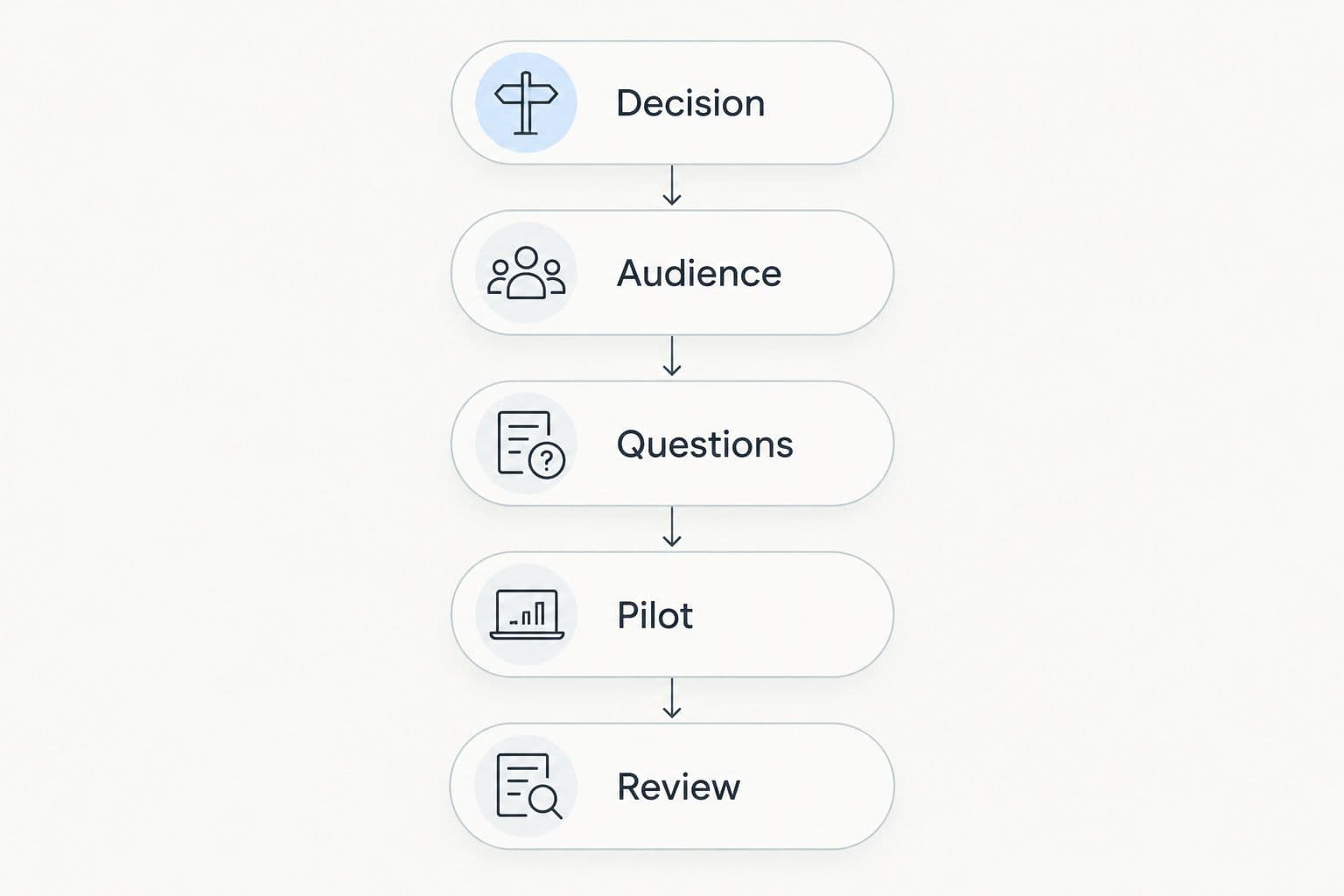
Choose the platform after the questionnaire reveals the features you need.
Keep product preference and health-history collection in 2 separate surveys when they serve different purposes. This is a practical boundary, not a claim that separation alone satisfies a privacy obligation.
Avoid leading prompts that build the desired answer into the question. Ask what influenced a purchase before asking whether a particular benefit mattered, and provide answer choices that allow disagreement.
How the tools are ranked
The fVnnel's 2026 ranking prioritizes question design, routing, distribution, analysis, respondent experience, and data governance. SurveyMonkey takes the default position because its survey-focused structure matches general customer-feedback work. The other tools own distinct use cases rather than competing for the same recommendation.
This is a functionality-based buying guide, not a report of comparative completion-rate testing. Verify current plan terms and relevant contractual requirements before selecting a platform. Your questionnaire and analysis needs determine which features matter.
Which survey tool should you choose?
Choose SurveyMonkey if you need a default for structured customer feedback. Choose Typeform for presentation-led questionnaires, Google Forms for straightforward research, Jotform for operational submissions, and Qualtrics for a defined complex research program.
For a 2026 rollout, avoid switching platforms to solve a question-design problem. First fix unclear wording, unnecessary fields, and an audience that does not match the decision. Then evaluate whether the current tool creates a genuine limitation.
The fVnnel's recommendation is to select the simplest platform that supports your required routing, analysis, and data handling. Keep a written reason for the choice so later feature requests do not turn into an unplanned research system.
FAQ
What's the best survey tool for a wellness brand?
SurveyMonkey is the best default in this guide for structured customer feedback. Typeform, Google Forms, Jotform, and Qualtrics fit different presentation, simplicity, operational, and research needs.
Is Typeform better than SurveyMonkey for wellness surveys?
Typeform is the better fit when question-by-question presentation is your priority; SurveyMonkey is the default here for structured feedback. Test your intended questionnaire and confirm the required analysis features before choosing.
Can I use Google Forms for customer feedback?
Yes, Google Forms suits straightforward customer-feedback questionnaires. Its connection with Google Sheets helps with response review, but access permissions and analysis still need deliberate setup.
Which survey tool should I use for client intake?
Jotform deserves consideration for operational forms, but clinical intake requires a separate privacy and workflow assessment. Do not assume that a general form builder meets your obligations for sensitive health information.
Do wellness-brand surveys need to be HIPAA compliant?
Not every wellness-brand survey falls under HIPAA. Applicability depends on the organization, its role, and the information involved; assess those factors before collecting health information.
How many questions should my customer survey include?
Include only the questions needed to support the intended decision. Start a draft with 5 core questions and 1 open-text question, then remove anything you cannot connect to an analysis task.
When should a wellness brand choose Qualtrics?
Choose Qualtrics when a defined research program requires detailed logic, organized distribution, and deeper analysis. Establish research ownership before adopting a more complex platform.
What should I compare before choosing a survey tool in 2026?
Compare question types, routing, distribution, exports, mobile experience, and data-governance requirements. Evaluate those features using your own draft questionnaire rather than a generic demonstration.
One last thing
A customer survey tells you what respondents report, not whether a wellness product produces a clinical outcome. Keep that distinction intact when turning answers into marketing copy.
Before publishing a claim based on survey results, check the exact question, who answered, and how those respondents were recruited. Preserve that context alongside the findings. Do not turn a customer preference into an efficacy claim. The best survey platform cannot repair that mistake after the answers have been collected.