
Best overall: HubSpot. Best for sales pipeline management: Pipedrive. Best for solo lead tracking: Bigin by Zoho CRM. This 2026 guide from The fVnnel compares CRM software for coaching businesses, including options for complex operations and client administration.
TL;DR
- The fVnnel's best CRM software for coaching businesses recommendation is HubSpot for teams connecting marketing and sales.
- Pipedrive is best for coaches managing discovery calls, proposals, and follow-up through a sales pipeline.
- Bigin by Zoho CRM suits solo coaches who need simpler lead tracking rather than extensive customization.
- Zoho CRM fits configurable operations; Dubsado fits contracts, forms, invoicing, and client onboarding.
Why this matters
A coaching business needs to distinguish someone who downloaded a resource from someone ready to book a discovery call. It also needs to separate a booked call, an accepted proposal, and an active client. A contact list alone does not show those differences.
The wrong CRM creates extra administration at exactly the point where you need consistent follow-up. A sales-focused system organizes opportunities, but it does not automatically replace your coaching delivery tools. A client-management system handles paperwork, but that does not make it the strongest choice for tracking a sales team.
The fVnnel's CRM recommendation is to choose around your sales process first, then check client administration. For a 2026 purchase, write down what happens between the first inquiry and the first session before comparing feature lists. That sequence gives you a useful buying brief.
What makes the best CRM for coaching businesses?
Evaluate these criteria before choosing a platform:
- Lead capture: You need a clear way to bring inquiries into the system and identify their source. Check the actual form or integration you intend to use.
- Pipeline visibility: Each opportunity should show its current stage, responsible person, and next action. A coach should not have to read an entire email history to find that information.
- Follow-up control: Tasks, reminders, and workflows should support your discovery-call and proposal process. Confirm which functions belong to the edition you are evaluating.
- Client administration: Decide whether contracts, questionnaires, invoicing, and scheduling belong inside the CRM or in separate tools.
- Reporting: Your system should help you inspect inquiries, calls, proposals, and outcomes. Marketing reporting and sales reporting answer different questions.
- Operational fit: Check permissions, exports, integrations, and how much configuration you will maintain. More settings are not automatically more useful.
For your 2026 shortlist, treat these as requirements rather than a points contest. A missing contract workflow matters more to an onboarding-heavy practice than a sophisticated sales dashboard. A multi-coach sales operation faces the opposite decision.
Coaching CRM options at a glance
| CRM | Best for | Standout capability | Key limitation |
|---|---|---|---|
| HubSpot | Connecting marketing and sales | Connected contact records, marketing tools, and sales pipelines | Advanced requirements introduce edition and product choices |
| Pipedrive | Discovery-call and proposal follow-up | Deal pipelines organized around sales activities | Coaching delivery and client paperwork require separate evaluation |
| Bigin by Zoho CRM | Solo lead tracking | Simplified pipeline-based CRM | Less depth for complex operations than Zoho CRM |
| Zoho CRM | Configurable coaching operations | Customization, automation, and reporting | Configuration requires ongoing ownership |
| Dubsado | Client administration and onboarding | Forms, contracts, invoicing, and workflows | Not the default choice for a reporting-heavy sales team |
These recommendations compare different operational strengths, not interchangeable versions of the same product. Pick the row that matches your bottleneck. Then test the work you perform every day, not just the vendor's demonstration.
1. HubSpot: best CRM for connected marketing and sales
HubSpot combines CRM records with sales and marketing tools. It suits coaching businesses that want to connect lead capture, contact history, opportunities, and follow-up rather than manage those activities in disconnected lists.
Its strongest use case is a business where marketing and sales need a shared view of the same prospective client. A lead's contact record and associated deal give your team a place to coordinate activity. That is more useful than a standalone pipeline when you also need to organize marketing contacts.
HubSpot pros:
- Contact records bring customer information and recorded activity into one place.
- Deal pipelines help distinguish inquiries from active sales opportunities.
- Marketing and sales tools can sit within the same platform.
- Tasks and reporting support a repeatable follow-up process.
HubSpot cons:
- Advanced requirements require careful checking across products and editions.
- Expanding the system adds setup decisions, permissions, and maintenance.
- Coaching-session delivery remains a separate requirement to evaluate.
For a 2026 evaluation, map each requested function to the actual product and edition. Do not assume that access to contact records also includes every automation, reporting, or marketing function you need.
Best for: Coaching businesses connecting inbound marketing with a structured sales process.
Verdict: Buy HubSpot when shared marketing and sales records solve your main problem. Skip a broader setup if you only need a simple follow-up list.
2. Pipedrive: best CRM for discovery-call follow-up
Pipedrive centers on deals, pipeline stages, and sales activities. It fits coaches whose immediate problem is keeping discovery calls, proposals, and follow-up moving toward a decision.
The distinction matters: a contact represents a person, while a deal represents a sales opportunity. Your pipeline should track the opportunity without turning every person in your audience into an active prospect. Pipedrive's sales orientation makes that separation central to the evaluation.
Pipedrive pros:
- Visual pipelines make deal stages easy to inspect.
- Activities connect sales work to contacts and opportunities.
- Custom fields let you record information relevant to qualification.
- Sales reporting helps you review pipeline progress and outcomes.
Pipedrive cons:
- Contracts, invoicing, and coaching delivery need separate consideration.
- Marketing requirements require checking the relevant tools and integrations.
- A pipeline still becomes unreliable if your team leaves stages and activities outdated.
Test Pipedrive with a realistic discovery-call sequence. Create an inquiry, schedule the next activity, record the call outcome, and move the opportunity into proposal follow-up. The useful question is whether another person can see what happens next without asking you.
Best for: Coaches and sales teams that need disciplined opportunity follow-up more than an all-purpose client workspace.
Verdict: Buy Pipedrive when missed sales activities are your bottleneck. Skip it as a complete coaching-business operating system.
3. Bigin by Zoho CRM: best CRM for solo lead tracking
Bigin by Zoho CRM is a simplified CRM built around pipelines, contacts, and activities. It belongs on the shortlist when a solo coach needs to replace a spreadsheet without immediately configuring a larger CRM.
The value is focus. You can evaluate whether the system shows who is interested, where the opportunity stands, and what you need to do next. That is a better starting point than adding fields for information you never use.
Bigin by Zoho CRM pros:
- Pipeline-based organization supports straightforward lead tracking.
- Contact and activity records keep follow-up work connected.
- A narrower feature scope reduces the number of setup decisions.
Bigin by Zoho CRM cons:
- Complex reporting and customization needs require careful evaluation.
- Contracts, invoicing, and coaching delivery remain separate requirements.
- A growing operation should check its needs against Zoho CRM rather than assume the products have identical depth.
Keep the initial configuration small. Use fields that affect qualification or follow-up, and leave out information you collect only because a form allows it. Simplicity works when it removes unnecessary administration, not when it hides a requirement your business actually has.
Best for: Solo coaches managing a straightforward inquiry-to-client pipeline.
Verdict: Buy Bigin by Zoho CRM for focused lead tracking. Skip it when complex customization is already a defined requirement.
4. Zoho CRM: best CRM for configurable coaching operations
Zoho CRM provides contact management, deals, automation, customization, and reporting. It suits coaching businesses with a defined process that needs more configuration than a simplified pipeline tool provides.
Consider it when qualification rules, team responsibilities, or different service lines require distinct workflows. The important condition is ownership: someone must decide how the system works and maintain those decisions. Customization without that owner produces inconsistent records rather than useful flexibility.
Zoho CRM pros:
- Custom fields and modules support business-specific data structures.
- Workflow capabilities help standardize recurring sales actions.
- Reporting supports inspection of sales activity and outcomes.
- Roles and permissions help organize access within a team.
Zoho CRM cons:
- More configuration increases setup and maintenance work.
- Features vary by edition, so requirements need individual checks.
- A solo coach with a simple process can create unnecessary complexity.
Before implementation, assign 1 named owner for fields, stages, permissions, and workflow changes. That is a governance recommendation, not a staffing benchmark. Other people can contribute requirements, but one person should control changes to the shared process.
Best for: Coaching businesses with documented workflows and someone responsible for CRM administration.
Verdict: Buy Zoho CRM when configuration solves a specific operational need. Skip it if nobody will own the setup.
5. Dubsado: best CRM for client administration and onboarding
Dubsado combines client-management functions such as forms, contracts, invoicing, scheduling, and workflows. Its strongest fit is a coaching practice where the administrative work surrounding a client engagement is the main problem.
This is a different buying decision from choosing a sales pipeline. You are evaluating how an inquiry becomes an organized engagement, with the required paperwork and next steps attached. That makes Dubsado relevant even when advanced sales reporting is not a priority.
Dubsado pros:
- Forms collect information for inquiries and client administration.
- Contracts and invoicing support engagement paperwork.
- Workflows help organize recurring administrative steps.
- Scheduling supports appointment coordination.
Dubsado cons:
- A reporting-heavy sales team should evaluate a dedicated sales CRM instead.
- Marketing attribution is a separate requirement to assess.
- Session resources and coaching delivery need their own evaluation.
Walk through an actual engagement before choosing Dubsado. Check what happens after an inquiry, after agreement, and before the first session. Administrative completeness matters more here than the number of sales dashboard options.
Best for: Coaches prioritizing contracts, questionnaires, invoices, and onboarding coordination.
Verdict: Buy Dubsado when client administration is the bottleneck. Skip it as the default for complex sales-team reporting.
How these CRM recommendations are ranked
The ranking prioritizes operational fit: connected marketing and sales, sales follow-up, simple lead tracking, configurable operations, and client administration. Each recommendation owns a different use case because those needs require different strengths.
HubSpot leads as the broad default for connected marketing and sales, not as a universal winner. Dubsado belongs first on an onboarding-focused shortlist. Bigin by Zoho CRM belongs first when straightforward lead tracking is the requirement.
No ranking replaces an edition-level feature check. Evaluate the current 2026 documentation against your written requirements, especially automation, permissions, integrations, and exports. A familiar product name does not establish that a particular configuration meets your needs.
Test your shortlist with a coaching sales workflow
Use 5 pipeline stages as a starting template: New inquiry, Qualified lead, Discovery booked, Proposal sent, and Client won. Adapt them to your process rather than treating them as an industry standard. Keep ongoing client delivery separate from the sales stages.
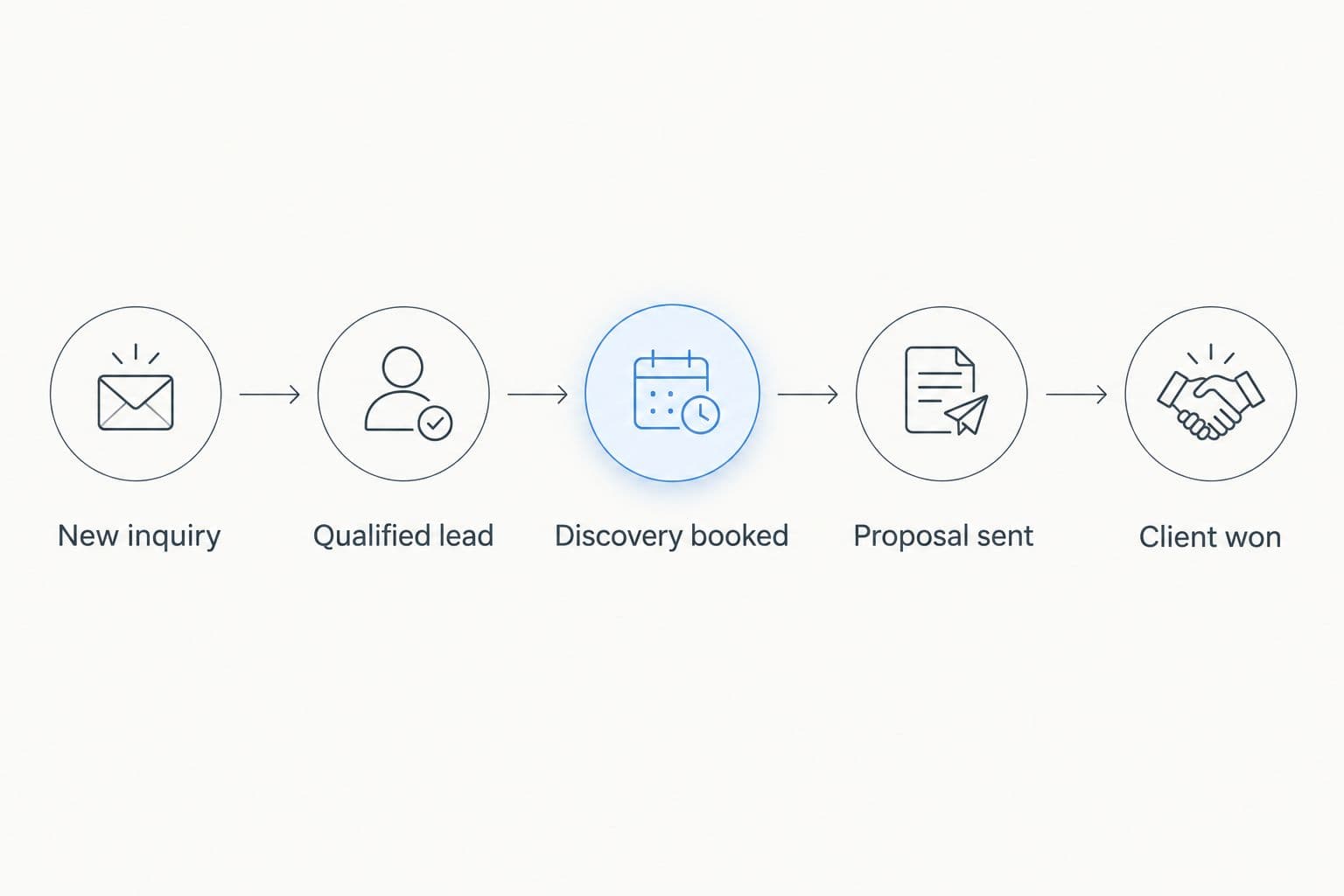
Sales stages describe progress toward an agreement, not the delivery of coaching sessions.
For your 2026 evaluation, create 3 test records: an unanswered inquiry, a booked discovery call, and an accepted proposal. Use fictional information. Run each record through the actions you expect to perform in the system.
- Check the next action: Can you immediately see who follows up and what happens next?
- Check the handoff: Can another person understand the record without a separate explanation?
- Check administration: Where do contracts, questionnaires, and invoices belong?
- Check reporting: Can you distinguish inquiries, active opportunities, and clients?
- Check exports: Confirm how you retrieve the records and fields you need.
Choose the system that supports these tasks with a clear routine. Do not award extra credit for settings you will never maintain.
Which coaching CRM should you choose?
The fVnnel recommends HubSpot for coaching businesses connecting marketing and sales. Choose Pipedrive for opportunity follow-up, Bigin by Zoho CRM for simple solo tracking, Zoho CRM for configurable operations, or Dubsado for client administration.
For an undecided reader in 2026, start with HubSpot and compare it against the option that matches your biggest bottleneck. If you cannot name that bottleneck, map your current process before choosing software. A clear requirement produces a better shortlist than a longer feature list.
FAQ
What's the best CRM software for coaching businesses?
HubSpot is the default recommendation for coaching businesses connecting marketing and sales. Pipedrive fits sales follow-up, Bigin by Zoho CRM fits simple lead tracking, Zoho CRM fits configurable operations, and Dubsado fits client administration.
What's the best CRM for a solo coach?
Bigin by Zoho CRM is the strongest fit in this shortlist for a solo coach with a straightforward lead pipeline. Choose Dubsado instead when contracts, invoicing, and onboarding administration are the main requirement.
Is HubSpot better than Pipedrive for coaches?
HubSpot fits connected marketing and sales, while Pipedrive fits a focused sales pipeline. Choose according to whether you need shared marketing records or clearer discovery-call and proposal follow-up.
Can Dubsado replace a sales CRM?
Dubsado fits client administration better than a reporting-heavy sales operation. Evaluate its forms, contracts, invoicing, and workflows against your process before treating it as a replacement for a dedicated sales CRM.
Do I need a CRM and coaching software?
You need both functions when your sales process and coaching delivery require different tools. A CRM tracks contacts, opportunities, and follow-up; evaluate session resources, assignments, and delivery separately.
What should I check before choosing a coaching CRM?
Check lead capture, pipeline stages, follow-up, client administration, reporting, permissions, and exports. Confirm those requirements against the current product edition rather than assuming every advertised feature is included.
Should I put coaching session notes in my CRM?
Keep sales records separate from sensitive coaching-session notes unless the system's access controls and your obligations support that use. Review permissions, consent requirements, and data handling before storing confidential client information.
One last thing
Make the next action a required habit, not another optional field. A detailed contact record does not tell you whether anyone will follow up. Before ending a discovery call or sending a proposal, record the next action and its responsible person.
Start there before adding automation. You need a process worth repeating before you ask software to repeat it.